

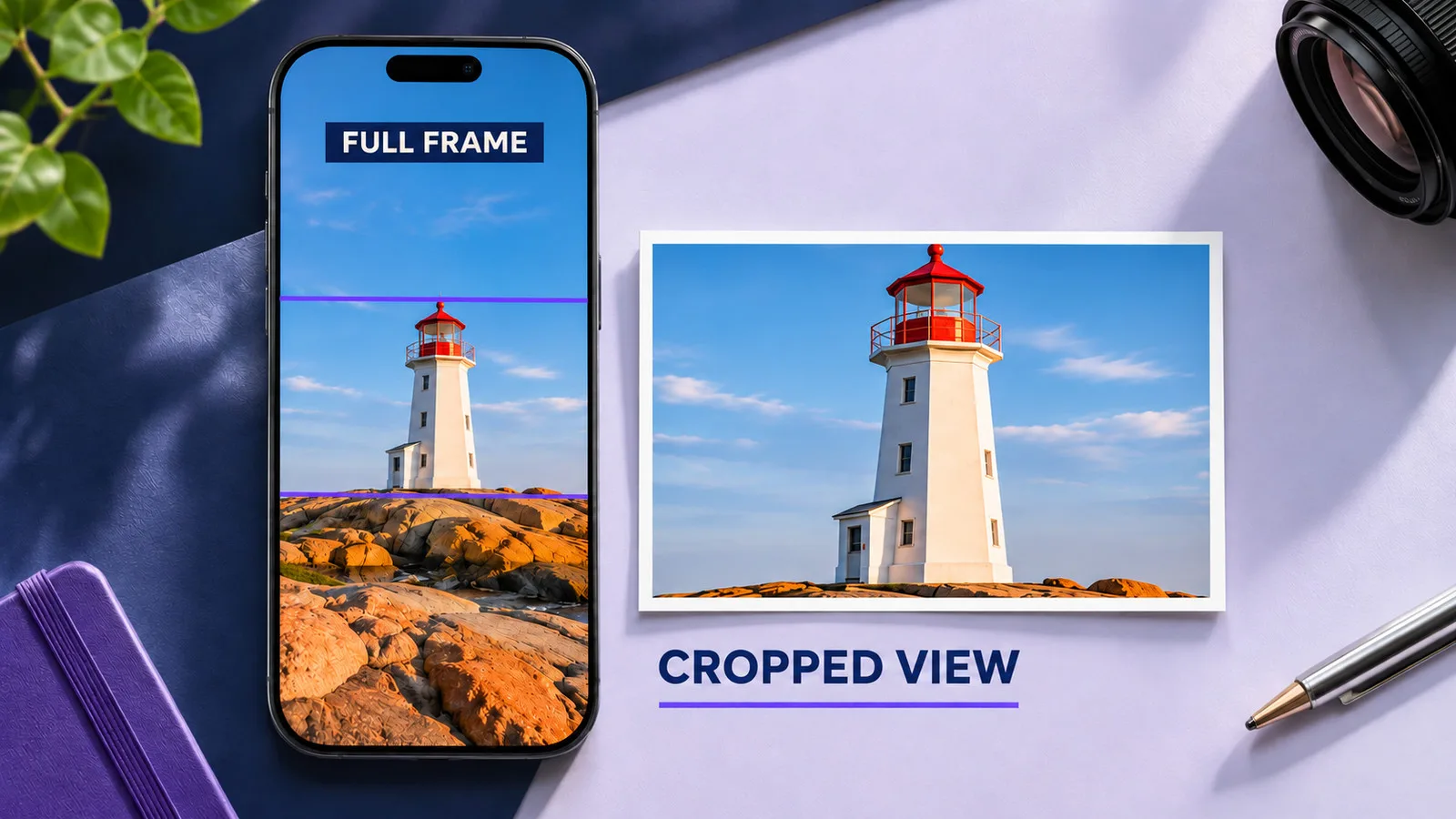
YouTube Shorts are vertical videos in a 9:16 ratio, typically 1080 by 1920 pixels, and YouTube recommends uploading Shorts thumbnails vertically at 2160 by 3840 pixels. But many YouTube surfaces display Shorts thumbnails cropped to a wider shape, closer to 3:2, so keep the face, key object and any text inside the central area of the frame.
Sizing a long video thumbnail is simple: 16:9, as large as you can export. Shorts are harder, because the same image is shown in different shapes depending on where it appears. This guide explains how to size a Shorts thumbnail and how to design it so it survives every crop. For how to set the thumbnail itself, see how to change the thumbnail on YouTube Shorts.
The basics
| Spec | Value |
|---|---|
| Shorts video ratio | 9:16 vertical |
| Recommended thumbnail size | 2160 x 3840 pixels (1080 x 1920 also works) |
| Display in many surfaces | Cropped, closer to 3:2 |
| Safe zone | The central area of the frame |
Design at the full vertical size so the thumbnail looks right where Shorts appear vertically, then make sure the center works on its own for the places where it is cropped.
Why Shorts thumbnails get cropped
Shorts appear in several places, and not all of them show the full vertical frame. On the channel page, in Search and in shelves on the Home feed, YouTube may show a wider crop. As reported when custom Shorts thumbnails launched in July 2026, the usable area in many placements is closer to 3:2 than to 9:16.
In practice, this means the top and bottom of your vertical image can disappear in some places. Anything important there, like a headline at the top or a face at the bottom, may never be seen.
How to design for the safe zone
- Start with a 2160 by 3840 canvas, or 1080 by 1920 if your tool works at that size.
- Mark the central band that would remain in a wider crop. A simple way is to draw a horizontal rectangle at roughly a 3:2 ratio across the middle of the canvas.
- Place the subject, face and any text inside that band.
- Use the top and bottom for background only: color, texture or scenery that can be lost without harm.
- Preview both shapes: the full vertical image and the central crop.
Text on Shorts thumbnails
Shorts thumbnails are often shown small and in dense grids. Text has even less room than on long video thumbnails:
- Two or three words at most, or none.
- Large, heavy letters near the center.
- Strong contrast with what is behind them.
Our guide on the best fonts for YouTube thumbnails lists typefaces that stay readable at small size.
Choosing a frame instead of uploading
If you pick a frame from the Short rather than uploading an image, the same rules apply. Plan a moment in the video where the subject is centered, clear and still for a second, so you have a good frame to choose.
File format and quality
Export as JPG for photos or PNG when text and edges must stay sharp. Use the sRGB color profile. If the thumbnail looks soft after upload, export at higher quality or as PNG.
Frequently asked questions
What is the best size for a YouTube Shorts thumbnail?
YouTube recommends 2160 by 3840 pixels in 9:16. Design at that size, or at 1080 by 1920, and keep key elements in the central area that survives a wider crop.
Can I use a 16:9 thumbnail for a Short?
Shorts are vertical, so a vertical thumbnail fits best where they appear in full. Because many surfaces crop to a wider shape, the central part of your vertical design matters most.
Why is my Shorts thumbnail cut off?
Many YouTube surfaces show Shorts thumbnails in a wider crop. Elements near the top or bottom of the vertical image can be cut. Move them towards the center.
Is the Shorts thumbnail size the same as for long videos?
No. Long videos use 16:9, with 3840 by 2160 recommended. See YouTube thumbnail size for those specs.
Sources
Your test this week
Open your channel page on your phone and look at the Shorts tab. Note which thumbnails have faces or text cut off at the top or bottom. Pick the Short among them with the most views from your channel page, and redesign its thumbnail with everything important in the center.